Pack architecture
A Software Pack is a self-contained, installable artifact published to a git repository. Once installed on NKP, it delivers a Capability such as a chat assistant, BI dashboards, or a model-serving stack.
Each pack is already wired into the platform's login, routing, and TLS, so users can open it from the landing page and start working.
Why packs exist
A platform that ships everything in one bundle is heavy to install, expensive to run, slow to change, and carries unused components that widen the attack surface. Packs solve this by giving NKP four properties:
- Composable: install only the Capabilities your users need. A team using Superset doesn't have to install LLM Serving, and vice versa.
- Independent upgrades: each pack upgrades on its own. Pulling in a new version of one pack leaves every other pack untouched.
- Bring your own pack: if no existing pack does what you need, you can build one yourself using the same template and resources OpenTeams uses.
- Smaller blast radius: if one pack breaks, the other packs keep working. You can debug, roll back, or remove the broken one without touching anything else.
What a pack contains
A Software Pack is a set of Kubernetes manifests, including:
- Your workloads (Deployments, Services, ConfigMaps, and anything else your application needs).
- A
NebariAppresource that tells the Nebari Operator to connect the pack to login, routing, and TLS automatically. The configuration reference lists the fields you can set.
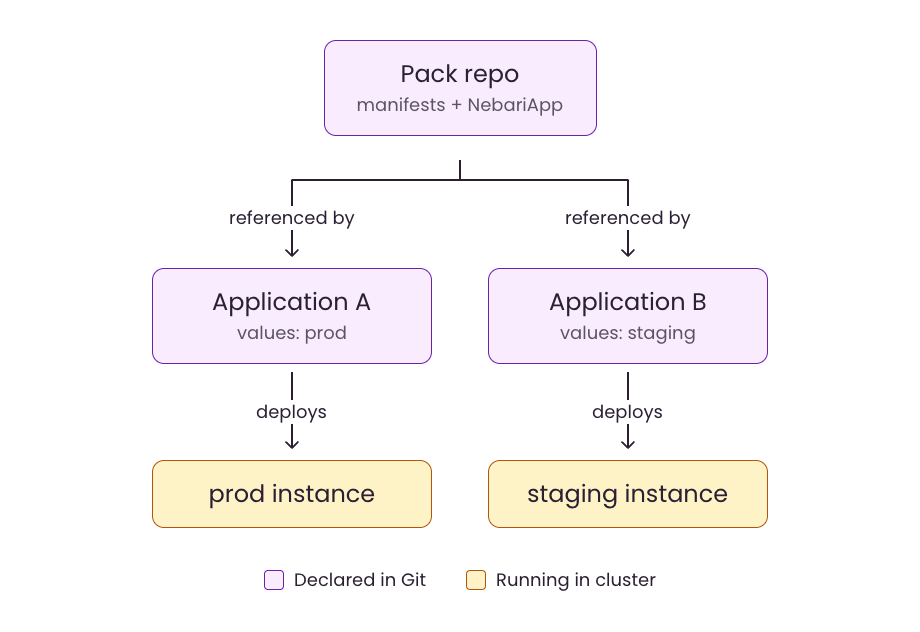
A pack is deployed by an ArgoCD Application (kept in a separate gitops repo) that references the pack and supplies its values. The same pack can therefore be deployed many times on one cluster with different configurations.
For example, you can deploy the same pack to production and staging by adding two Applications to your gitops repo with different values:
The NebariApp resource
The pack ships a NebariApp manifest that declares how the pack should integrate with the platform: which hostname to expose, which Kubernetes Service should receive traffic, whether to enable TLS, and whether to require login.
From the NebariApp, the Nebari Operator creates:
- An
HTTPRoutethat sends traffic for the hostname to the target service. - A
Certificatefor the hostname, so users connect over HTTPS. - A Keycloak client that lets users authenticate with their existing platform account.
The pack writes the manifest as a template; the ArgoCD Application supplies the values (hostname, service name, and so on) at deploy time.
Pack lifecycle
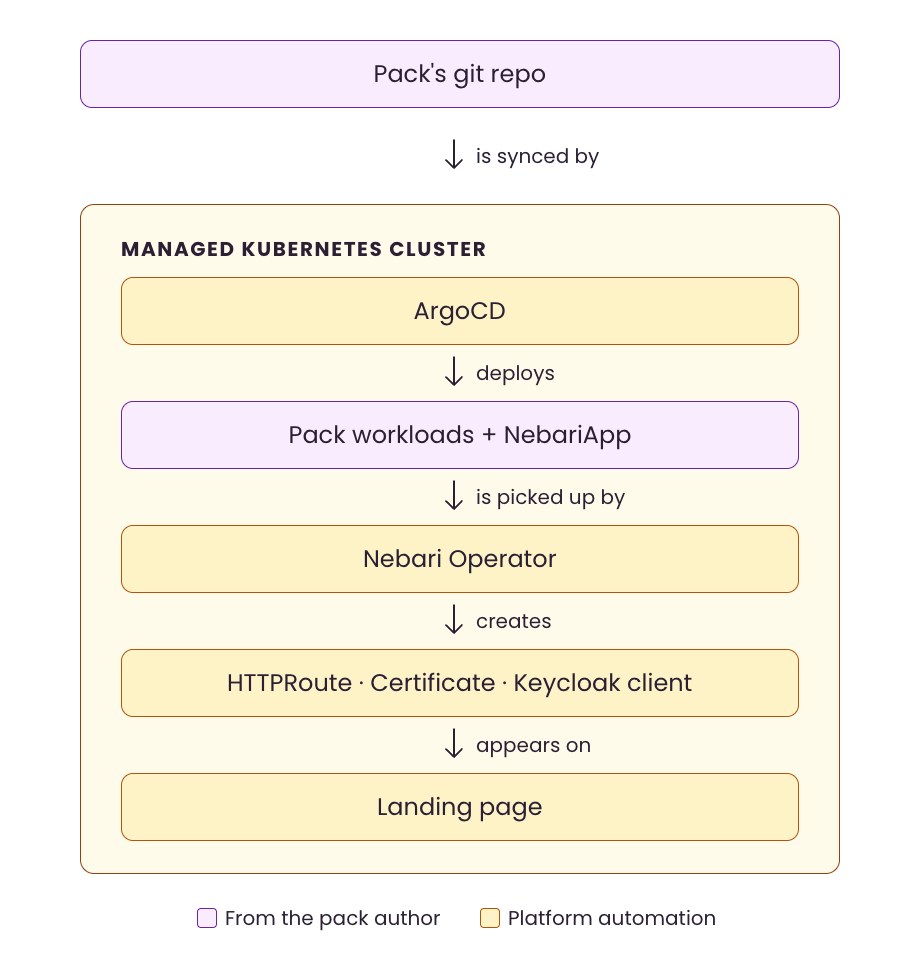
A pack takes four steps to get from a git repo to the landing page:
- The pack is installed onto a cluster via ArgoCD. An ArgoCD
Applicationmanifest points at the pack's repo, and ArgoCD syncs from there. - ArgoCD deploys the pack's workloads and the
NebariAppinto the cluster. - The Nebari Operator picks up the
NebariAppand creates the routing, certificate, and Keycloak client that the pack needs. - The pack appears on the landing page as an available Capability.
Where packs come from
Packs are published to git repositories, and they come from two channels:
- Official packs. Maintained by OpenTeams and published under the
nebari-devGitHub organization. See the pack catalog for the current list. - Community packs. Anyone outside OpenTeams can build one, whether that's an open-source maintainer or your own team. A community pack follows the same structure as an official pack. See Build your own pack to author one.