NKP architecture
Nebari Kubernetes Platform (NKP) is how end users get to AI capabilities like chat assistants, document analyzers, and code review tools, without their team having to assemble a platform first.
Developers package each capability as a Software Pack. NKP wires in login, routing, TLS, and observability, so users just open the landing page and click in.
Software Packs come from two places:
- Official packs maintained by OpenTeams.
- Community packs built and maintained by anyone outside OpenTeams: open-source contributors, businesses building on Nebari, or your own internal team.
How the layers fit together
NKP is a stack of layers, each doing one job. Because the layers connect through stable, well-defined interfaces, you can change one layer without rewriting the others.
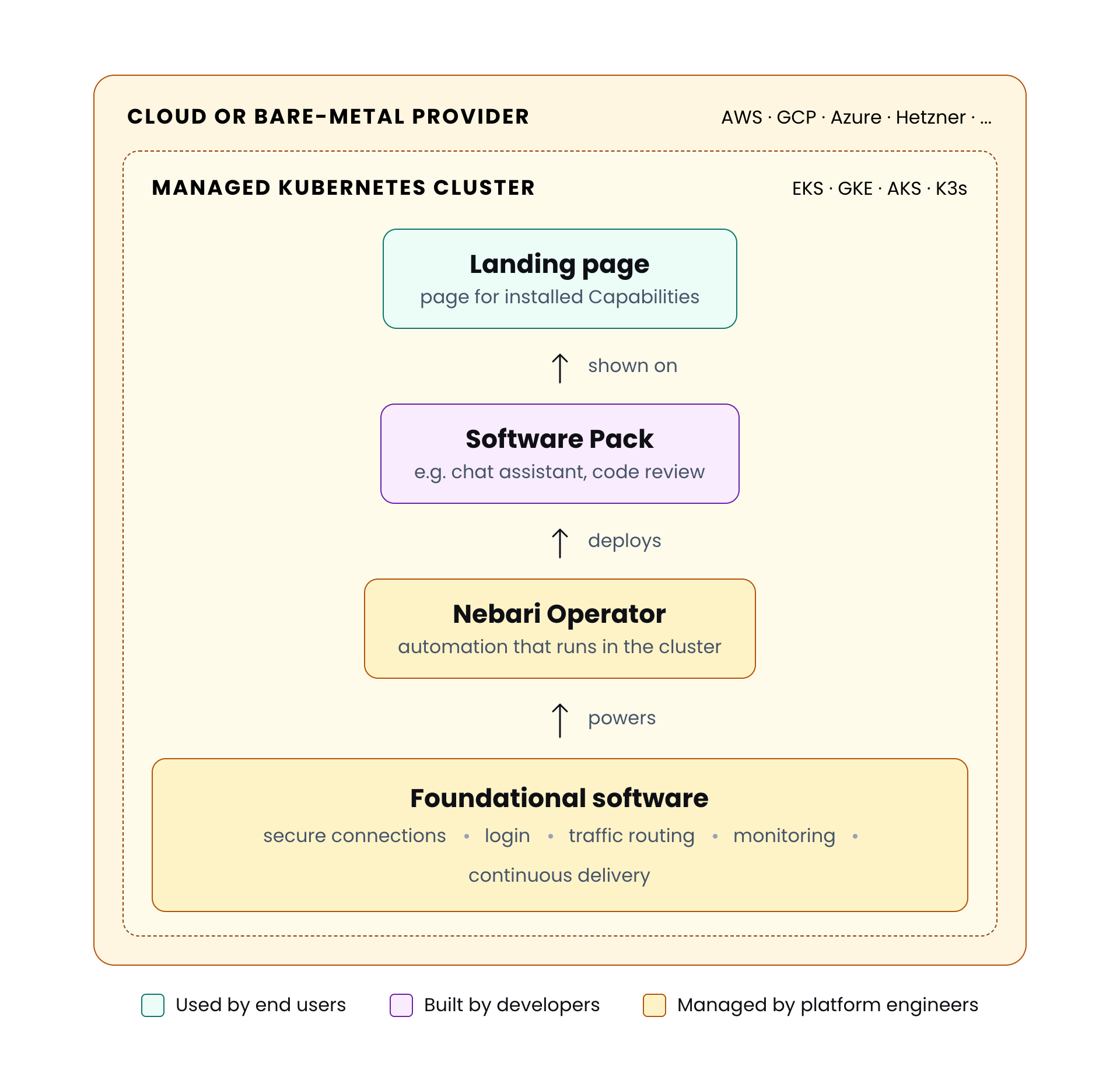
Used by end users
- Capabilities: the AI features end users actually rely on (chat assistants, document analyzers, code review tools, and so on).
- Landing page: the home page where users sign in and open each installed Capability.
Built by developers
- Software Pack: an installable Capability (chat assistant, document analyzer, code review tool, and so on).
Managed by platform engineers
- Nebari Operator: the automation that deploys each Software Pack and connects it to the Foundational software.
- Foundational software: shared services (secure connections, login, traffic routing, monitoring, continuous delivery from Git) that power the operator and every running pack.
Where it all runs
- Managed Kubernetes cluster: hosts every container above. EKS for AWS, K3s for Hetzner and local development.
- Cloud or bare-metal provider: the physical infrastructure underneath. AWS, Hetzner, or your own machine for development.
What's in the foundational layer
- cert-manager: keeps secure connections working. Automatically requests, renews, and rotates HTTPS certificates for every domain in the cluster.
- Envoy Gateway: handles traffic routing. Inspects incoming requests and forwards each one to the right service, with built-in rate limiting and authentication checks.
- Keycloak: handles login. One sign-on covers every app on the platform (ArgoCD, Grafana, Software Packs), with support for multi-factor authentication and connection to an existing identity provider like Active Directory.
- OpenTelemetry Collector: collects logs, metrics, and traces from every running pack so they can be forwarded to an observability backend.
The nic CLI
The nic CLI (short for Nebari Infrastructure Core) is the command-line tool for installing, updating, and tearing down NKP's cloud infrastructure.
What nic does
- Creates the cloud infrastructure. This includes the network, the managed Kubernetes cluster and its worker machines, the identity and access controls, and the persistent storage.
- Prepares the cluster. Sets up the basic Kubernetes structures the platform relies on: organizational groupings (namespaces), permission rules (RBAC), storage templates (storage classes), and network rules (network policies).
- Installs ArgoCD. ArgoCD is the GitOps engine that delivers everything above the cluster (the foundational software, the operator, and the packs).
nicinstalls it directly so the rest of the platform can flow in from a Git repository.
What nic does not do
nicis not an application manager. It does not install or upgrade Software Packs, the Nebari Operator, or any of the foundational software beyond ArgoCD. Those are all delivered from Git through ArgoCD.nicdoes not change the cluster directly after install. Anything that needs to happen inside a running cluster (a new pack, an updated config) goes through Git first, and ArgoCD applies it.
This split keeps cluster work (the bottom of the stack) and pack work (the top) from blocking each other. Updating the cluster's underlying machines doesn't affect the running packs, and rolling out a new pack version doesn't require a nic deploy.
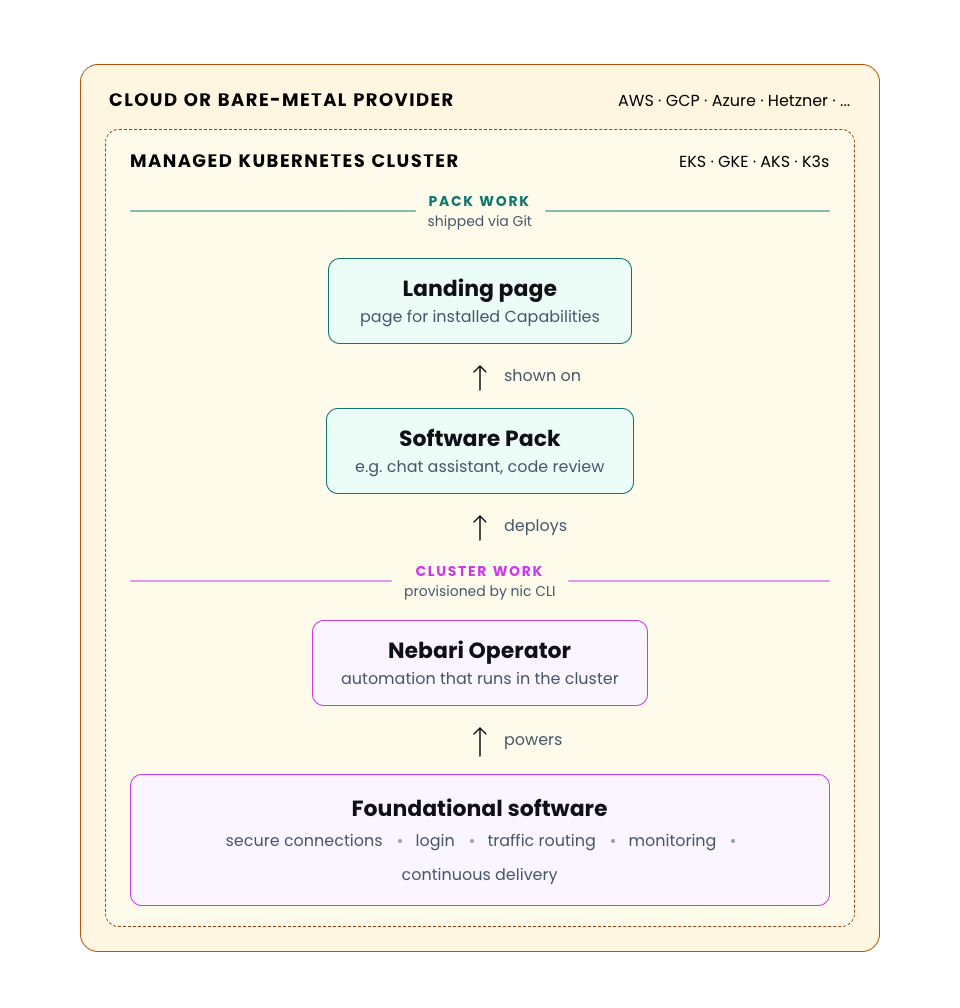
GitOps via ArgoCD
ArgoCD is an open-source deployment tool for Kubernetes. It installs and updates every foundational component on the cluster from two kinds of sources:
- OpenTeams Git repositories: for OpenTeams-built pieces like the landing page and the Nebari Operator.
- Upstream Helm charts: for external open-source pieces like Keycloak, cert-manager, Envoy Gateway, and the OpenTelemetry Collector.
A few properties follow from this:
- No hidden changes: Every piece of software in the cluster is there because ArgoCD pulled it from a known source. Nothing runs that you can't trace back to a repository or a Helm chart.
- Self-healing: If a user manually deletes or changes something in the cluster, ArgoCD detects the difference and restores it from the source.
- Audit trail and easy rollback: Every platform change is captured in Git, so you can see who changed what and when, and undoing a change is a single
git revert. - Independent updates: Each Software Pack moves on its own cadence. Updating one pack doesn't require coordinating with the others, and removing one leaves the rest untouched.
State and locking
For providers that use OpenTofu under the hood (AWS today), nic keeps a state record of everything it builds. This record gives nic two abilities on those providers:
-
Locking: If two engineers run
nic deployat the same time, the second one waits until the first one finishes, so they can't make conflicting changes. -
Catches manual changes: When someone makes a manual change in the cloud (resizing a node group in the console, editing an IAM policy by hand), running
nic deploy --dry-runshows the difference, andnic deployapplies the correction.
Providers that don't use OpenTofu (Hetzner today) take a different provisioning path and don't rely on this state file.
Where to go next
- Get started with NKP: install the platform and run your first cluster.
- Browse Software Packs: see what Capabilities are available out of the box.